
Trackers (AniList, MyAnimeList, Kitsu, MangaUpdates)
A tracker keeps your reading list on a website such as AniList. Matane can send it the chapters you read, so the list stays right without you typing anything. AniList, MyAnimeList, Kitsu and MangaUpdates are supported.
Connect
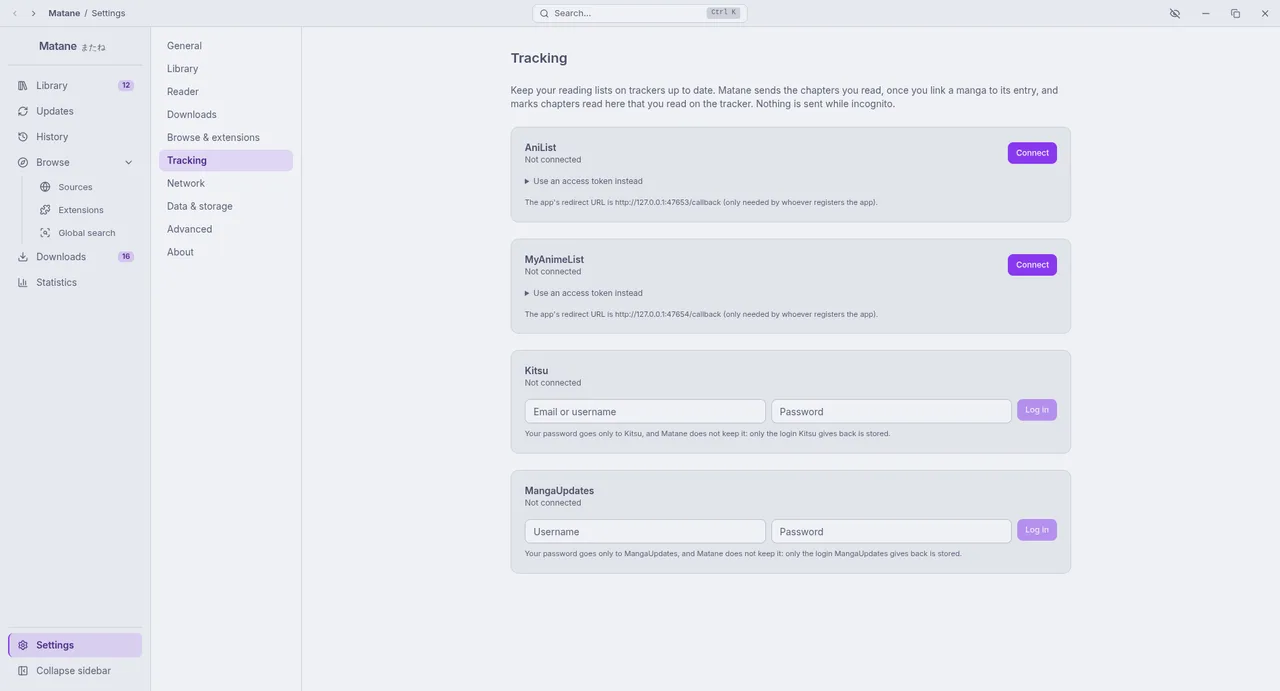
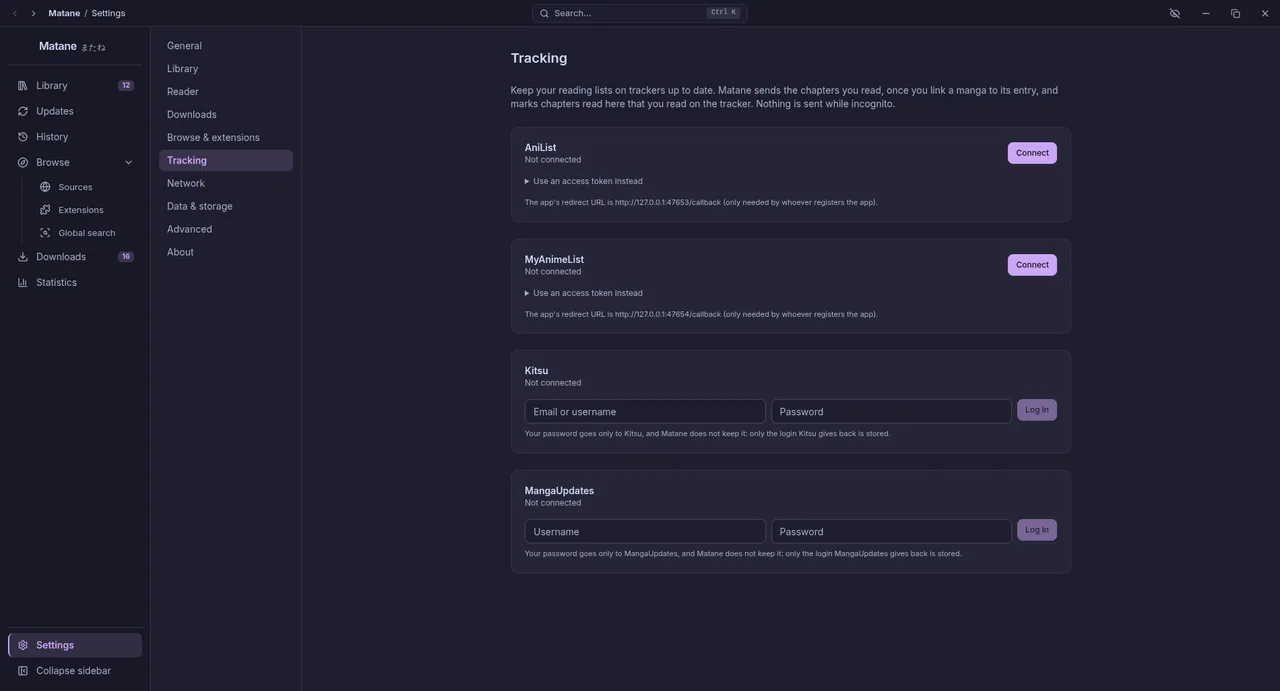
Open Settings → Tracking and press Connect next to a tracker. Your browser opens its login; allow Matane, and the browser page says you can come back. The page returns to Matane through a small address on your own computer (http://127.0.0.1:47653/callback for AniList, …:47654/callback for MyAnimeList) that exists only while you log in, and Matane never sees your password.
- An AniList login lasts a year. A MyAnimeList login is renewed by itself in the background, for as long as you use it.
- When a tracker stops accepting the login, Settings → Tracking says so and you connect again.
- A tracker whose card says "this build has no app registration" cannot log in yet (see the end of this page).
Kitsu and MangaUpdates have no login page for apps, so their cards ask for your username (Kitsu: email or username) and password instead. The password goes only to that service and is not kept: Matane stores the login the service gives back, and the field empties itself as soon as it was used.
- If the login does not come back (a firewall, a program using that port), Use an access token instead accepts a token you made yourself.
- Matane keeps the login in your system's keyring when there is one. If there is none, it says that the login is stored without encryption.
Link a manga
On a manga's page press Tracking. Matane searches each connected tracker for its title (MyAnimeList needs at least 3 letters); pick the right entry and press Link. A manga can be linked to one entry per tracker.
- If the manga is already on your list, its status, score and dates stay as they are, and Matane only adds the chapters you read here that the list lacks.
- If it is not, a new entry is made: Reading with what you have read, or Planning to read when nothing is.
- Change the status, score (0 to 10), chapters read and dates in the same dialog. A change is saved at once and sent when the tracker can be reached.
- MyAnimeList scores are whole numbers (8.6 is sent as 9), and a date you clear stays on MyAnimeList: its service cannot remove one.
- Kitsu rates in halves (8.6 becomes 8.5). MangaUpdates has no start or finish dates, so those fields are not sent, and it files a manga in one of its lists: Reading, Wish list, Complete, Unfinished or On hold (Dropped goes to Unfinished).
- Kitsu's site checks visitors with Cloudflare. If it blocks a request, Settings → Tracking says so and Matane tries again later.
What is sent
When you finish a chapter, mark chapters as read, or use "mark previous as read", the linked entry moves to the highest chapter number you have read (a half chapter counts down; a manga whose chapters have no numbers counts the chapters read).
- An entry only moves forward: marking something unread, or reading an earlier chapter, changes nothing.
- A Completed entry stays completed.
- Nothing is sent while incognito is on.
- Reading never waits for the network. Updates are queued; if AniList is down or you are offline they are sent later, retried with longer and longer pauses, and Settings → Tracking shows how many wait and the last problem. Send now tries again at once.
Two-way sync
Matane also brings back what you read elsewhere. A manga you read on your phone, or an entry you changed on the tracker's website, is compared with your library:
- If the tracker is ahead, the chapters up to its number are marked read here. They are not sent back.
- If the tracker is behind (for example you read while offline for a while), it gets an update.
- Status, score and dates you change on the website are taken over here.
- A change you made here that is still waiting to be sent is never overwritten.
This happens a little after Matane opens, when the library has been checked for new chapters, and when you press Sync now (in Settings → Tracking for one tracker, or in a manga's Tracking dialog for that manga). You can switch off the marking of chapters as read, for one tracker (Settings → Tracking) or for one manga (its Tracking dialog); reading is still sent. While incognito is on nothing is sent, but chapters can still be brought in.
Backups and other computers
Backups keep which manga is linked to which entry (with its status, score, progress and whether to follow the tracker), never the login. After a restore, connect again and the links go on working.
For people who build Matane
Each tracker needs an app registration; Matane uses flows that need only the client id, never a secret.
- AniList (implicit grant): register the app with the redirect URL shown under the AniList card in Settings → Tracking, and put the id in
apps/desktop/src/main/trackers/client-ids.ts. - MyAnimeList (code flow with PKCE): create an app of type Other at myanimelist.net/apiconfig with the redirect URL shown under the MyAnimeList card (
http://127.0.0.1:47654/callback), and put its client id in the same file. MyAnimeList shows a client secret for some app types; Matane never uses one.
A build without an id cannot log in to that tracker and says so. Kitsu and MangaUpdates need nothing from you: they log in with the user's own password (Kitsu's published app credentials are in client-ids.ts).