
Network: DNS-over-HTTPS and proxy
All of this is in Settings → Network and applies immediately, without a restart. It covers every request: sources, images, repositories and updates.
DNS-over-HTTPS
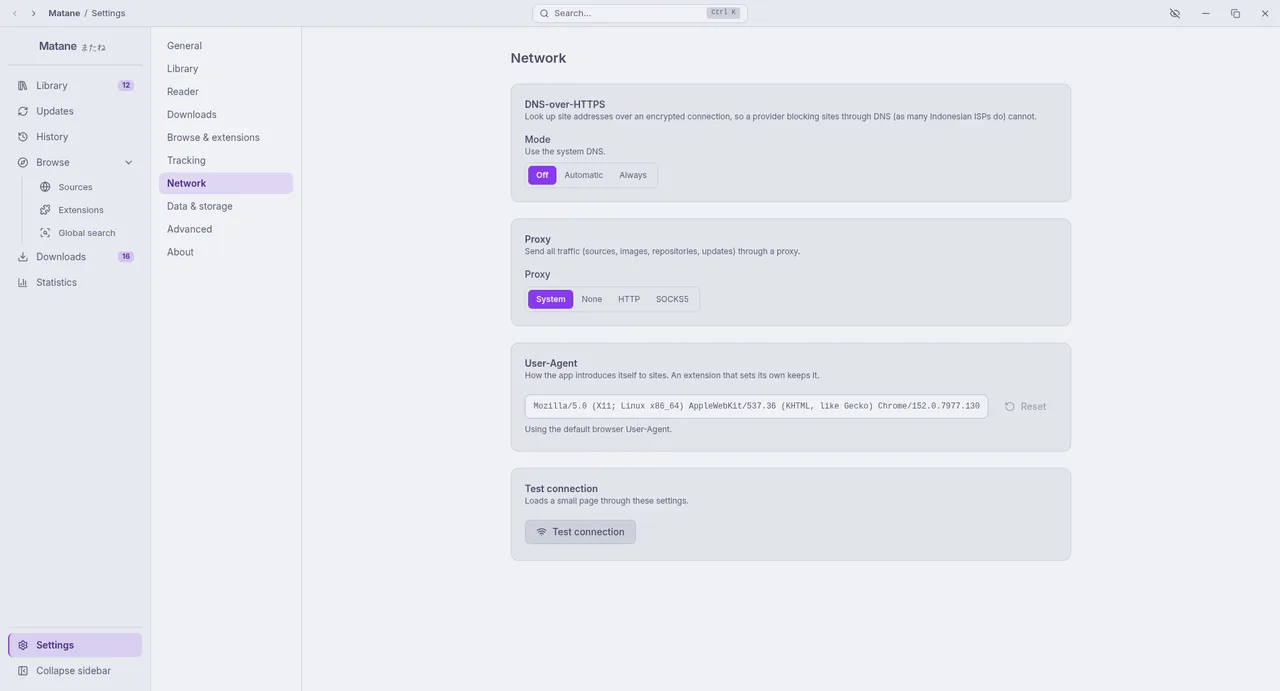
Many internet providers block sites by answering DNS lookups with a wrong address. This is common in Indonesia (Internet Positif), where several manga sites are unreachable with the provider's DNS. DNS-over-HTTPS looks addresses up over an encrypted connection the provider cannot change.
| Mode | Behaviour |
|---|---|
| Off | Use the system DNS |
| Automatic | Use DNS-over-HTTPS, and the system DNS when it does not answer |
| Always | Only DNS-over-HTTPS; sites stay unreachable when it does not answer |
Servers: Cloudflare, Google, Quad9, AdGuard, or a custom https:// URL.
For users in Indonesia
Choose Always with Cloudflare or Google, then press Test connection. If a site is still blocked, the provider blocks it by more than DNS: use a proxy or VPN.
Proxy
- System: follow the operating system's proxy settings (default).
- None: connect directly.
- HTTP or SOCKS5: host, port, and an optional username and password.
The password is stored on this computer, encrypted when the system has a keyring (Windows, macOS, most Linux desktops), and only sent when the proxy asks for it.
User-Agent
How Matane introduces itself to websites. By default it is a regular browser's. Change it if a site insists on another; Reset goes back. Extensions that set their own keep theirs.
Test connection
Loads a small page through these settings and shows the time it took or the error, so you can check a change right away.
Cloudflare checks
Some sites check visitors with Cloudflare. Matane solves the check itself when it can, and opens a window when you need to help: press Verify where it is offered, complete the check, and the request is repeated.